Reports you can act on immediately

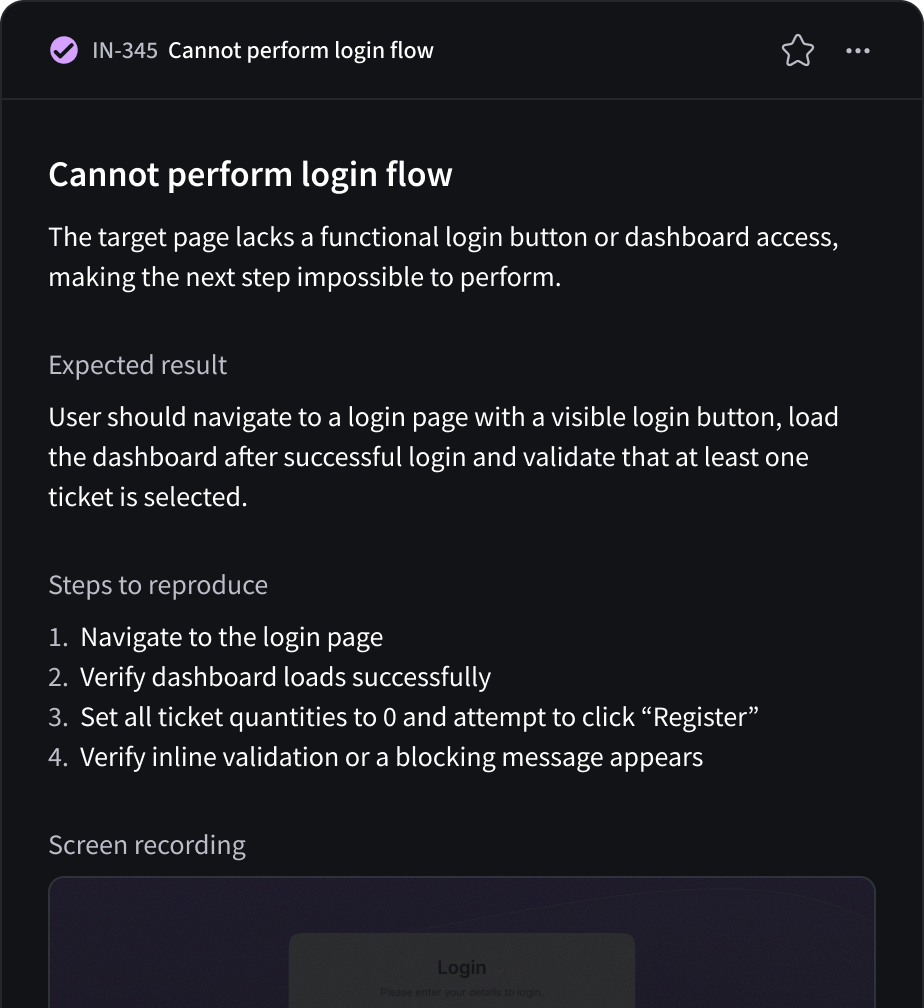
QA flow delivers complete bug reports with reproducible steps and precise technical analysis that sync directly to Jira and Linear.

Test scenario 1.0.3 showing a failed status for verifying flight search with steps: selecting homepage event, clicking travel packages, failing at navigating 'Select Departing Flight' frame due to missing fields, and ensuring all criteria are filled.
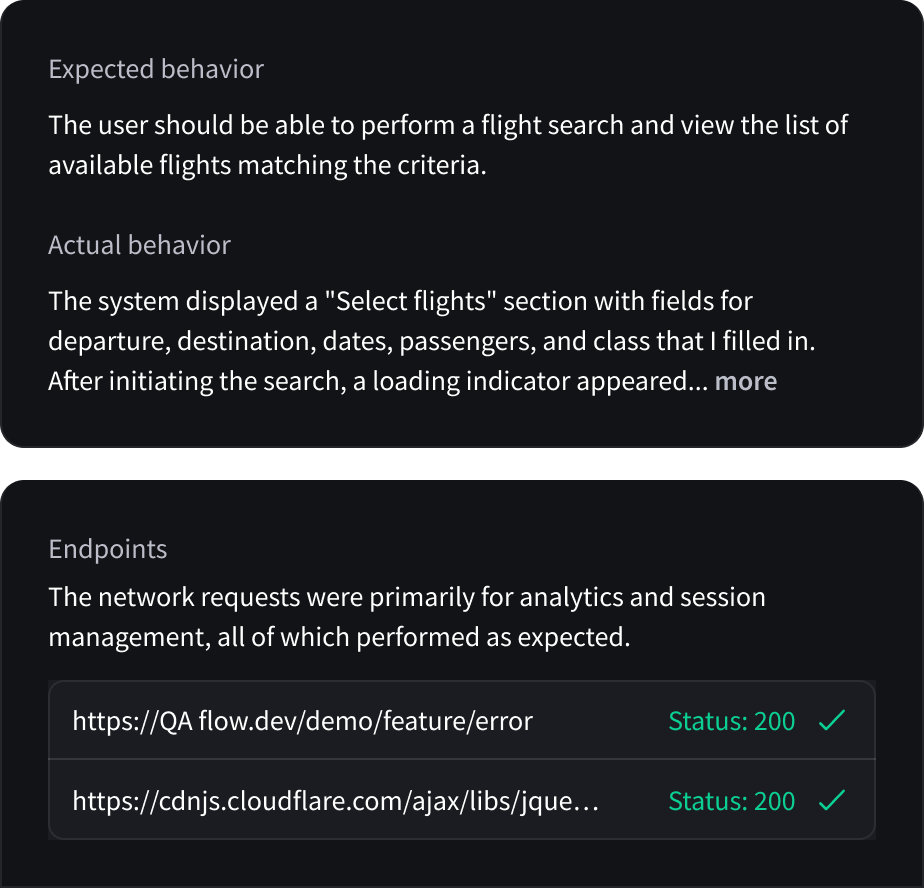
Text showing expected behavior for flight search and actual behavior describing a 'Select flights' section with departure, destination, dates, passengers, and class fields, plus endpoints with network request URLs and status 200.
Two task cards: one from QA team to re-run the test scenario and log observed behaviors, another from Development team to investigate the genre filter and review front-end code for correct filter processing.
Test scenario 1.0.3 showing a failed status for verifying flight search with steps: selecting homepage event, clicking travel packages, failing at navigating 'Select Departing Flight' frame due to missing fields, and ensuring all criteria are filled.
TEST STEPS

Full traceability

QA flow records every executed step and maps it to the exact result, so you can see precisely where a failure occurred with clear, reproducible sequences.

DOCUMENTATION

Clarity at a glance

Each report offers a concise overview of what was tested, what was expected and what actually happened so teams can understand the issue without digging into logs.

Text showing expected behavior for flight search and actual behavior describing a 'Select flights' section with departure, destination, dates, passengers, and class fields, plus endpoints with network request URLs and status 200.
NEXT STEPS

Guide your team

Receive recommended investigation paths, validation steps, and retest guidance so teams move from failure to fix faster.

Two task cards: one from QA team to re-run the test scenario and log observed behaviors, another from Development team to investigate the genre filter and review front-end code for correct filter processing.

Invite & collaborate

Invite teammates to review reports, comment on failures, and align on fixes with shared context and version history.

Priority support

Users on the Test Run plan receive priority support to investigate failures faster and unblock releases.

Export & share

Download or share complete bug reports with recordings and execution details for easy stakeholder review.

Versioned bug history

Track reports across test runs, compare failures between builds, and see when a bug was introduced or resolved.

Share and sync
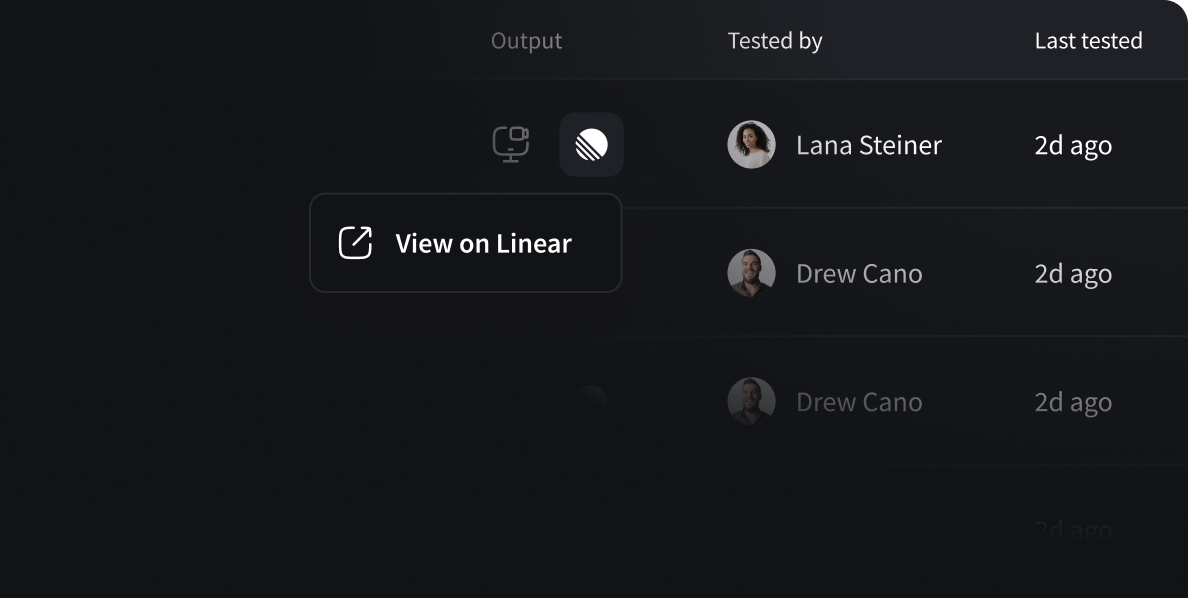
Push structured bug tickets directly to Jira and Linear, and soon to Slack channels with our upcoming integration.
Interface showing test results with columns for Output, Tested by with profile photos and names, and Last tested dates. Buttons include 'View on Linear'.

Stop writing your bug tickets manually

82%
Less time writing tickets
100%
Reproducible test steps
2x
Faster root cause detection
1
Click push to Jira or Linear

Frequently asked questions

How does AI testing work with QA flow?

QA flow uses advanced AI test automation to understand your application's intended behavior. Our TestDesign Agent analyzes your documentation-Figma files, PRDs, or user stories-and automatically generates comprehensive test cases. These tests run in parallel in secure cloud environments, with results delivered in minutes. When tests fail, QA flow creates tickets with full context including screenshots and logs, so developers can fix issues without back-and-forth.

Who is QA flow built for?

QA flow is designed for Series B+ SaaS companies with engineering teams of 15 or more who want to shipfaster without sacrificing quality. It's ideal for teams that:
• Can't afford a $120K+ QA hire but need professional QA coverage
• Want to reduce reliance on expensive QA outsourcing
• Need 24/7 automated testing without managing infrastructure
• Want to redeploy QA engineers to higher-value work

What makes QA flow different from other AI testing tools?

Unlike traditional automated testing tools that require weeks of setup and constant maintenance, QA flow istruly autonomous:
• No manual test writing: AI generates tests from your existing documentation
• Self-healing tests: Tests automatically adapt when your UI changes
• Zero infrastructure: Tests run in our secure cloud-we don't touch your codebase
• Direct issue tracking: Failed tests become actionable tickets automatically
• Managed service: Dedicated support for setup and optimization

What types of testing does QA flow support?

QA flow handles comprehensive QA automation including:
• Functional testing: Validates features work as specified
• Regression testing: Ensures new changes don't break existing functionality
• UI/UX testing: Verifies visual elements match design specifications
• End-to-end testing: Tests complete user flows across your application

What integrations does QA flow support?

QA flow integrates with your existing workflow:
Issue tracking: Jira, Linear
Communication: Slack notifications
Design tools: Figma file import
CI/CD: Trigger tests on deployment
Any tech stack: We don't touch your codebase, so we work with any framework

Does QA flow work with my tech stack?

Yes. QA flow works with any technology stack because we test your application from the outside-the sameway your users experience it. Whether you're running React, Vue, Angular, Ruby on Rails, Python, or any otherframework, QA flow can test your application without accessing or modifying your codebase.

What results can I expect from AI QA testing?

Based on early adopter data, teams using QA flow typically see:
60% more bugs caught before reaching production
82% reduction in QA cycle time (from 14 days to 3 days average)
90% fewer bugs reaching production environments
$240K+ annual savings by redeploying QA resources
2x faster shipping with higher confidence

Is there a free trial or audit?

Yes. We offer a free QA audit where our team analyzes your current QA process and shows you exactly howQA flow would improve your testing coverage and efficiency. This includes identifying gaps in your current testcoverage and projecting time/cost savings.

How long does it take to get started?

Most teams are up and running within 1-2 weeks:
Week 1: Onboarding, documentation upload, initial test generation
Week 2: Test suite refinement, integration setup, go-liveUnlike traditional test automation that requires 3+ months of buildout, QA flow's AI generates tests immediatelyfrom your existing documentation.

Is QA flow secure? Do you access our codebase?

QA flow is designed with security-first principles:
No codebase access: We test from the outside, like a real user
Secure cloud execution: Tests run in isolated virtual machines
SOC 2 compliant infrastructure: Enterprise-grade security
No data retention: Test data is not stored beyond session completion
We never need access to your source code, database, or internal systems.

How does QA flow handle test maintenance?

Traditional automated tests break when UI elements change, creating a maintenance burden. QA flow usesself-healing technology-our AI automatically adapts tests when your application's UI changes. This reducestest maintenance by up to 90% compared to traditional Selenium or Playwright scripts.

Can I export my tests or is there vendor lock-in?

Your test cases and results are always accessible. You can export test documentation and results at any time.We believe in earning your business through results, not lock-in.

What support is included?

Every QA flow subscription includes:
Dedicated onboarding: We help you upload documentation and generate your first test suite
Ongoing optimization: Regular reviews to improve test coverage
Customer success manager: Direct access to support for questions
Monitoring dashboards: Real-time analytics on test results, costs, and time savings
Slack/email support: Fast responses to technical questions

Do you offer training or certification?

Yes. QA flow University is our certification program for QA professionals looking to master AI-powered testingmethodologies. Certified members get:
• Early access to new features
• Exclusive community access
• Professional credential recognition
• Advanced training on AI QA strategies

How do I get started with QA flow?

Getting started is simple:
1. Request a free audit: We'll analyze your current QA process
2. See QA flow in action: Watch our demo or schedule a live walkthrough
3. Start your trial: Upload your first Figma file or PRD and see AI-generated tests
Ready to ship faster with fewer bugs? Visit qaflow.com to get started.