AI QA ENGINEER

Deploy autonomous AI agents to test your app 24/7

Turn your Figma designs, user stories, documents, and API specs into automated tests, while bugs go straight to Jira or Linear.

THE PROBLEM

Manual QA slows you down

Manual test writing is slow

Repetitive test writing and execution drain engineering capacity.

Test cases go out of date

As products change, coverage breaks and automation becomes brittle.

Issues surface too late

SEO, accessibility, and performance problems are found after users.

QA tools don’t talk to each other

Context is lost between design, development, and testing.

MEET QA FLOW

Your AI powered QA suite

QA flow helps teams generate test cases, run automated tests, and audit live websites for bugs, performance, and accessibility issues in one platform.
Run tests automatically

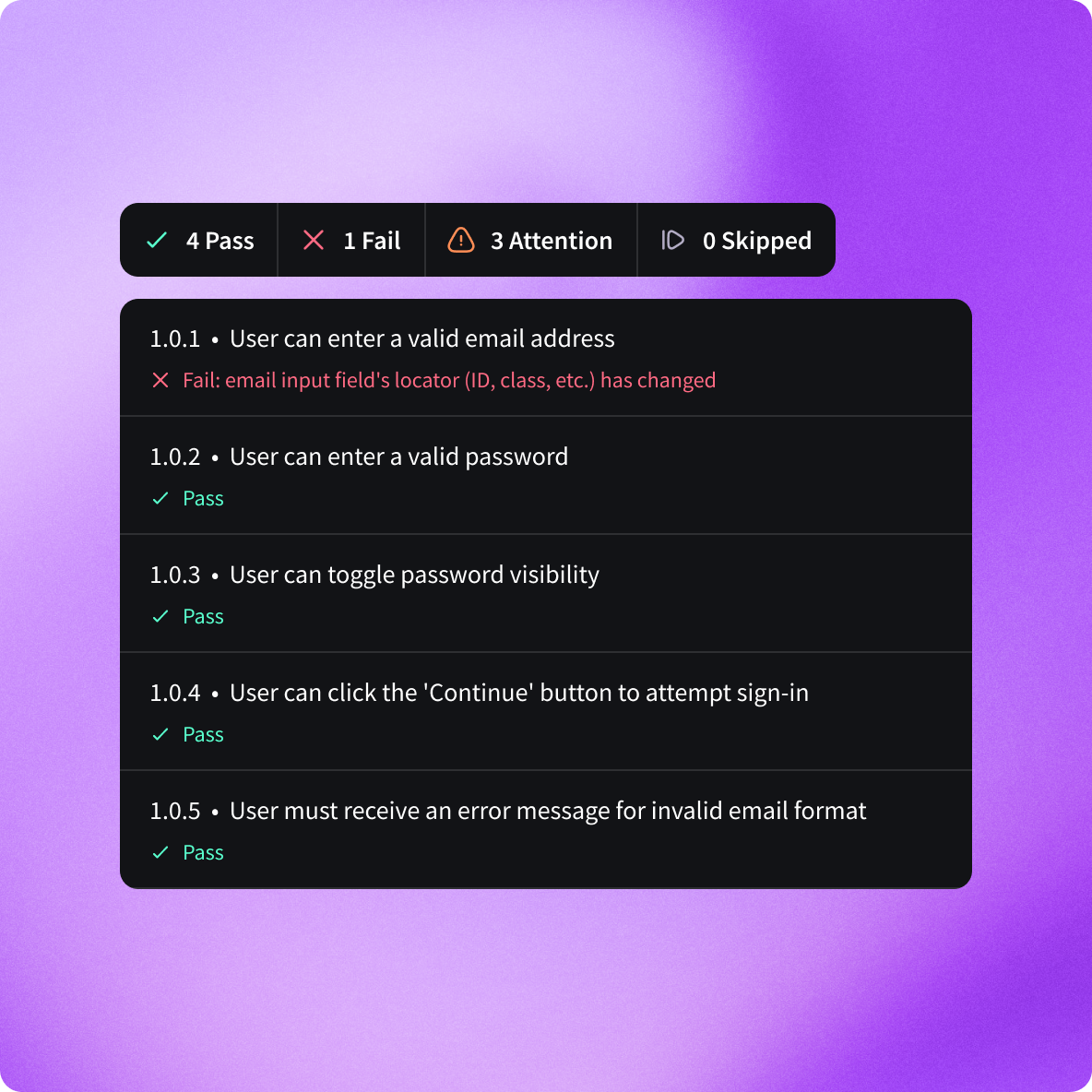
Run tests and automatically create bug tickets in Jira, Linear and more.

Full product context

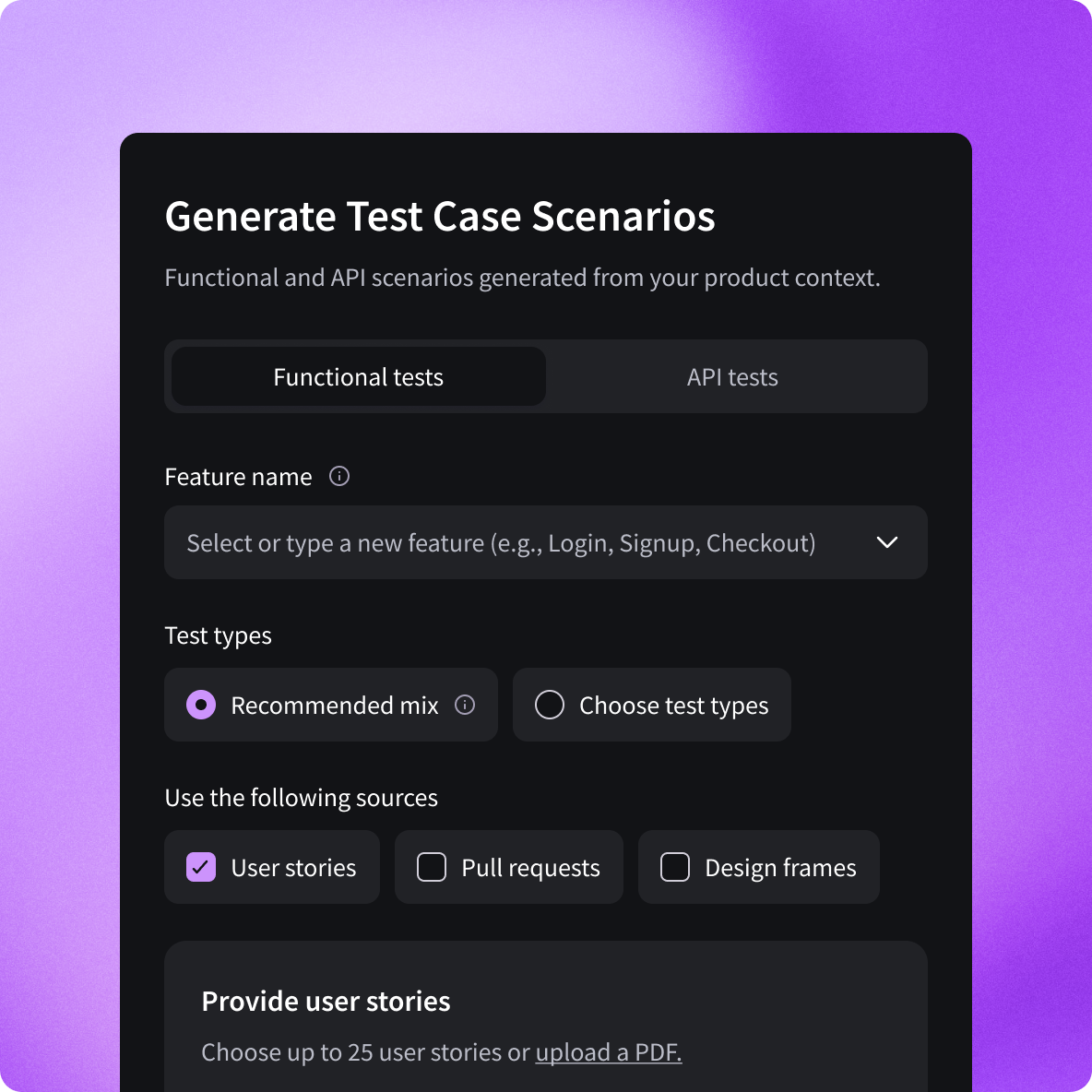
Generate functional and API test cases from real product inputs in seconds.

No QA team required

Skip the 3-month automation buildout and start running tests immediately.

Works with your existing stack

Import from your tools and export directly to your testing platform.

How QA flow generates and runs tests

From product inputs to generated test cases, automated execution, and actionable bug reports. All in one unified QA workflow.

Visualize a real test output sheet with functional test cases

Connect your inputs

Import tickets, pull requests, API documentation, PRDs, or Figma designs.
Figma
Github
new
Documents
Linear
Jira

Generate and run tests

Automatically generate functional and API test cases, then run them in QA flow or sync with your test management tools and CI pipelines.
TestMO
PractiTest
TestRail
Zephyr

Export and sync results

Export structured test cases or create bug tickets in Jira and Linear to keep your team aligned.
Linear
Jira

“QA flow removed the need for an extra QA engineer and accelerated our team.”

Portrait of a smiling man with short hair wearing a brown jacket, with green foliage background.

Robin Schenck

QA & Release Manager, Ollie

As seen on
NewsBreak logo with stylized arrow symbol and text.Business Insider logoWashington City Paper logo in bold uppercase letters.Logo of Times of San Diego newspaper in gray text on white background.
SEO performance dashboard showing 5 issues including missing description and H1 marked as urgent, with bugs categorized by urgency level.

Catch website issues before users do

Run a one-click audit to uncover SEO, accessibility, AI search, security, performance, and content issues — with prioritized fixes.

No setup required. Results in minutes.

Stop spending hours writing test cases

Integrate with your existing tools
Figma logo with stylized letter F icon and text.Jira logoLinear company logo with a striped circle to the left of the text.Postman logoSlack logoGitHub logo
COMING SOON

Figma plugin

Generate test scenarios directly from Figma designs, automatically extracting user flows, states, and interactions.

User interface screen for generating test case scenarios with options for functional and API tests, feature name input, test types, source selection, and a highlighted button labeled 'Generate scenarios'.

Some love from our community

“QA flow completely changed how we write test cases. We dropped in a PR and within minutes had structured, high-quality scenarios that actually reflected the real risks in our feature.”
Max Ostrove
CEO at Studiobox
“QA flow takes our requirements and turns them into well-organized test scenarios without the usual back and forth. It saves us time every sprint.”
Amanda Connon-Unda
Director of Marketing at Elevate
“QA flow lets our team prioritize improvements immediately without needing extra analysis.”
Devin Charhon
Co-founder & CEO at Blue Jeans Golf
“If you care about performance, accessibility, and technical health, QA flow’s website audit is a great place to start. It gives you visibility you might not have.”
Tara Zedayko
Co-founder & CEO at DIG Labs
“I recommend QA flow to any team that wants stronger test coverage without slowing down development. We use it to turn product requirements into structured test cases in minutes, and it consistently surfaces edge cases we might have overlooked.”
Roger Sabat
Founder & CEO at Biiibo Inc.
“Our QA cycles are faster since adopting QA flow. The generated steps are structured in a way that fits seamlessly into our workflow.”
Yuliia Pron
Head of Marketing at Fuelfinance
“QA flow helps us move from planning to execution without friction. The test steps are detailed enough to be actionable but still easy to review.”
Aram Melkoumov
CEO at Crowdlinker
“QA flow consistently delivers thoughtful test scenarios based on our features. It helps us catch edge cases earlier in the development cycle.”
Andrew Chaffin
Co-founder at Argo Analytics
“We used QA flow’s website audit before a launch and it quickly highlighted performance and SEO gaps. It gave us a clear plan of action.”
Barron Caster
CEO at Leo Wallet
“I recommend QA flow to anyone managing a growing site. The audit surfaces issues that are easy to miss during day-to-day development.”
Valentin Staykov
Co-founder & CEO at Pastel
“Instead of starting from a blank page, we now rely on QA flow to build our initial test suite. It gives us strong coverage right from the start.”
Grant Roscoe
CEO at Crescent Cares
“QA flow gave us a comprehensive view of our website’s technical issues in one place. That alone made it worth adopting.”
Mike Bitar
Founder & CEO at Axia

Frequently asked questions

How does AI testing work with QA flow?

QA flow uses advanced AI test automation to understand your application's intended behavior. Our Test Design Agent analyzes your documentation - Figma files, PRDs, or user stories-and automatically generates comprehensive test cases. These tests run in parallel in secure cloud environments, with results delivered in minutes. When tests fail, QA flow creates tickets with full context including screenshots and logs, so developers can fix issues without back-and-forth.

Who is QA flow built for?

QA flow is designed for Series B+ SaaS companies with engineering teams of 15 or more who want to ship faster without sacrificing quality. It's ideal for teams that:

• Can't afford a $120K+ QA hire but need professional QA coverage
• Want to reduce reliance on expensive QA outsourcing
• Need 24/7 automated testing without managing infrastructure
• Want to redeploy QA engineers to higher-value work

What makes QA flow different from other AI testing tools?

Unlike traditional automated testing tools that require weeks of setup and constant maintenance, QA flow is truly autonomous:

• No manual test writing: AI generates tests from your existing documentation
• Self-healing tests: Tests automatically adapt when your UI changes
• Zero infrastructure: Tests run in our secure cloud-we don't touch your codebase
• Direct issue tracking: Failed tests become actionable tickets automatically
• Managed service: Dedicated support for setup and optimization

What types of testing does QA flow support?

QA flow handles comprehensive QA automation including:

• Functional testing: Validates features work as specified
• Regression testing: Ensures new changes don't break existing functionality
• UI/UX testing: Verifies visual elements match design specifications
• End-to-end testing: Tests complete user flows across your application

What integrations does QA flow support?

QA flow integrates with your existing workflow:

Issue tracking: Jira, Linear
Communication: Slack notifications
Design tools: Figma file import
CI/CD: Trigger tests on deployment
Any tech stack: We don't touch your codebase, so we work with any framework

Does QA flow work with my tech stack?

Yes. QA flow works with any technology stack because we test your application from the outside-the same way your users experience it. Whether you're running React, Vue, Angular, Ruby on Rails, Python, or any other framework, QA flow can test your application without accessing or modifying your codebase.

What results can I expect from AI QA testing?

Based on early adopter data, teams using QA flow typically see:

60% more bugs caught before reaching production
82% reduction in QA cycle time (from 14 days to 3 days average)
90% fewer bugs reaching production environments
$240K+ annual savings by redeploying QA resources
2x faster shipping with higher confidence

Is there a free trial or audit?

Yes. We offer a free QA audit where our team analyzes your current QA process and shows you exactly how QA flow would improve your testing coverage and efficiency. This includes identifying gaps in your current test coverage and projecting time/cost savings.

How long does it take to get started?

Most teams are up and running within 1-2 weeks:

Week 1: Onboarding, documentation upload, initial test generation
Week 2: Test suite refinement, integration setup, go-live Unlike traditional test automation that requires 3+ months of buildout, QA flow's AI generates tests immediately from your existing documentation.

Is QA flow secure? Do you access our codebase?

QA flow is designed with security-first principles:

No codebase access: We test from the outside, like a real user
Secure cloud execution: Tests run in isolated virtual machines
SOC 2 compliant infrastructure: Enterprise-grade security
No data retention: Test data is not stored beyond session completion
We never need access to your source code, database, or internal systems.

How does QA flow handle test maintenance?

Traditional automated tests break when UI elements change, creating a maintenance burden. QA flow uses self-healing technology-our AI automatically adapts tests when your application's UI changes. This reduces test maintenance by up to 90% compared to traditional Selenium or Playwright scripts.

Can I export my tests or is there vendor lock-in?

Your test cases and results are always accessible. You can export test documentation and results at any time. We believe in earning your business through results, not lock-in.

What support is included?

Every QA flow subscription includes:

Dedicated onboarding: We help you upload documentation and generate your first test suite
Ongoing optimization: Regular reviews to improve test coverage
Customer success manager: Direct access to support for questions
Monitoring dashboards: Real-time analytics on test results, costs, and time savings
Slack/email support: Fast responses to technical questions

Do you offer training or certification?

Yes. QA flow University is our certification program for QA professionals looking to master AI-powered testing methodologies. Certified members get:

• Early access to new features
• Exclusive community access
• Professional credential recognition
• Advanced training on AI QA strategies

How do I get started with QA flow?

Getting started is simple:

1. Request a free audit: We'll analyze your current QA process
2. See QA flow in action: Watch our demo or schedule a live walkthrough
3. Start your trial: Upload your first Figma file or PRD and see AI-generated tests

Ready to ship faster with fewer bugs?
Visit qaflow.com to get started.